AI Usage and Limits
Last updated
Free plan daily limit
The Free plan includes a small daily AI limit so you can try the Revise AI Agent and make occasional AI edits without paying for Revise.
Free plan usage resets on a rolling 24 hour window. If you reach the limit, you can come back after it resets, or upgrade to a paid plan to keep working now.
Paid plan usage limits
Revise Plus, Pro, and Max have no daily limits, and include a high monthly AI allowance. This allows for long, uninterrupted working sessions.
How does the monthly limit work?
Revise offers AI models from OpenAI (GPT), Anthropic (Claude), Google (Gemini), and xAI (Grok). These models all cost different amounts of money for every word they process.
Accordingly, paying Revise customers get allocated a monthly limit which they can spend using whichever models they like. This usage is measured internally in the actual dollar cost of your requests to the AI providers used by Revise.
Revise Plus includes enough usage for at least 200 AI prompts per month, when using GPT-5.6 Luna. Revise Pro includes four times as much monthly usage as Plus, so at least 800 Luna prompts per month for typical users. Revise Max includes twenty times as much monthly usage as Plus - at least 4,000 Luna prompts per month - built for the heaviest AI workloads. Your AI usage varies based on how much work you are having the agent do for each prompt, and these estimates are based off actual customer usage data.
You can see how much of your monthly limit you have left in your Account dropdown in the top right corner of the screen:
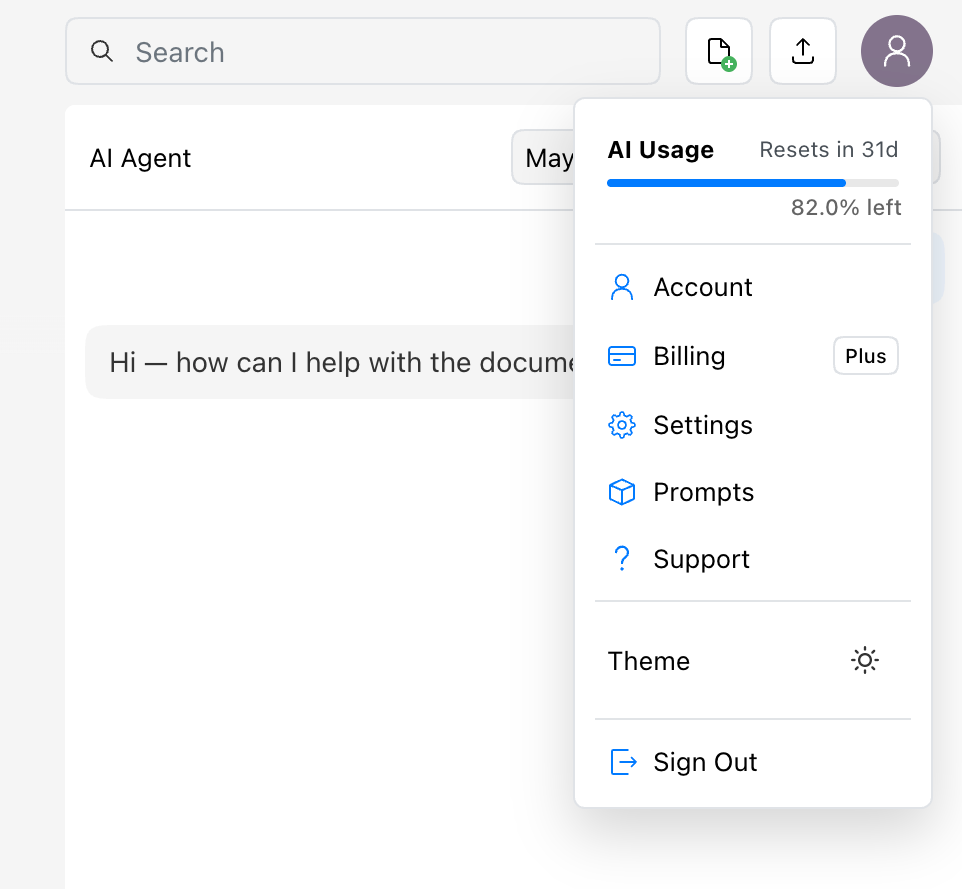 You can view your current AI Usage in your account dropdown
Revise customers can also choose to use more intelligent models such as GPT-5.6 Terra and Claude Sonnet 5, which offer better reasoning and more creative writing skills, but at a higher cost. These models will use your monthly limit faster than Luna.
How much do different models cost?
This table shows approximately how much of your limit each model will use compared to GPT-5.6 Luna, which is the default model for Revise. Note that these are based off internal benchmarks of real AI agent work - not just API prices from the providers! Some models are more efficient than others, so they cannot be compared purely on per-token costs.
While these numbers are based on real benchmarks, they are just an approximation. Actual usage will still vary with prompt length, document context, attachments, web search use, and how complicated your requests are.
Model Multiplier Breakdown
| Model | Provider | Usage Multiplier | Plan |
|---|---|---|---|
| GPT-5.6 Luna | OpenAI | ~1 ✕ | Plus, Pro, Max |
| GPT-5.6 Terra | OpenAI | ~11 ✕ | Plus, Pro, Max |
| GPT-5.6 Sol | OpenAI | ~26 ✕ | Pro, Max |
| Gemini 3.7 Flash | ~9.5 ✕ | Plus, Pro, Max | |
| Grok 4.5 | xAI | ~16 ✕ | Plus, Pro, Max |
| Grok 4.1 Fast | xAI | ~84 ✕ | Plus, Pro, Max |
| Grok 4.1 Reasoning | xAI | ~2 ✕ | Plus, Pro, Max |
| Claude Haiku 4.5 | Anthropic | ~6 ✕ | Free, Plus, Pro, Max |
| Claude Sonnet 5 | Anthropic | ~15 ✕ | Plus, Pro, Max |
| Claude Opus 5 | Anthropic | ~38 ✕ | Pro, Max |
What uses more of your limit
- Always using a high-end model - for example, setting your model to Claude Opus and never changing it will use your limit much faster.
- Long documents and large selections - more text gives the model more to read.
- Large attachments - PDFs, images, Word files, and big pasted references add context the model needs to process.
- Open-ended requests - broad prompts like "improve this whole document" can require many reads, edits, and checks.
- Web search and document search - retrieving and reading outside context adds work to the turn.
- Long autonomous requests - multi-step work can require many reads, edits, and verification passes before the agent finishes.
How to use your limit efficiently
- Start with a fast, low-multiplier model for routine edits, summaries, formatting changes, outlines, and brainstorming.
- Switch to a stronger model when the task needs deeper reasoning, careful synthesis, or a final quality pass.
- Select the exact passage you want edited instead of asking the agent to scan the whole document.
- Ask for one clear outcome at a time: "shorten this section by 20%" is usually more efficient than "make this better."
- Use headings and sections in your document so the agent can find the right place quickly.
- Attach only the pages, excerpts, or files that matter for the current request.
- Use the AI Rewriter for quick standalone rewrites of shorter text snippets. AI Rewriter is simpler and uses much less of your monthly limit than the main document editor interface.
When to use each model type
In general, cheaper models are good for simpler edits while more expensive models are best for changes that require more thought, research, or lots of creative writing.
If you reach your limit
Revise also protects each individual agent request from consuming an unexpectedly large share of your allowance. Free requests can use up to $0.10 in the current daily window. A Plus request can use up to 10% of the plan's effective monthly allowance; Pro and Max requests can use up to 5%. If a request reaches that safeguard, the agent summarizes its progress and you can explicitly ask it to continue in a new message.
If you reach your monthly limit and want to keep using Revise, you can upgrade to a higher plan - Revise Pro or Max - for a higher limit. Every paid plan can also enable Extra Usage in Billing Settings to keep using AI on a pay-as-you-go basis for the rest of the month.
Free tier usage resets on a rolling daily window - so if you don't want to upgrade yet you can just come back tomorrow!
If you are close to the limit, use less expensive models and keep your prompts focused.