Conversations
Last updated
A conversation is one chat thread with the AI agent in the chat panel. Each document keeps its own conversations, and each person has their own. Conversations save automatically as you work. For how to send a request, see AI Agent.
The first time you open the chat on a document, Revise creates an empty conversation. After that, opening the document loads your most recent conversation.
Start a new conversation
- Click + (New Conversation) in the panel header.
- Type your request in the empty chat.

The button does nothing while the current conversation has no messages. The new conversation starts without the earlier messages, but the agent still reads the document. Suggestions from other conversations stay in the document until someone accepts or rejects them. See also Start a new conversation in the AI Agent article.
Switch between conversations
Once a document has two or more conversations, a list appears in the panel header, left of +. Click it and choose a conversation.
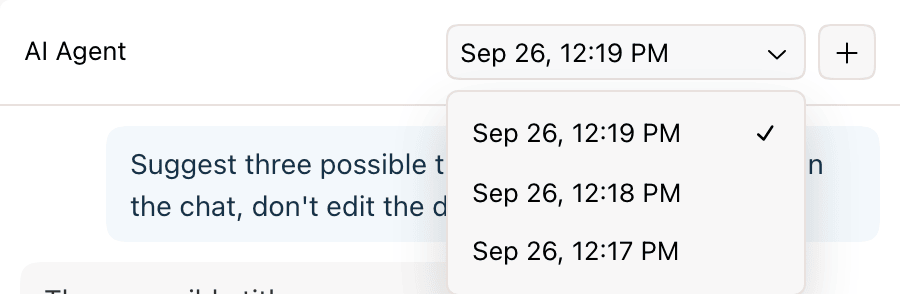
- The list shows the current conversation first, then the others from most recently opened.
- Switching during a request stops the request. Your message stays in the conversation without a reply.
- A message you typed but did not send stays in that conversation's input when you come back. Unsent text is kept in the browser you typed it in.
How conversations are labeled
Conversations have no names, and Revise doesn't generate titles for them. The list labels each one with the date and time you last opened it, such as Sep 26, 12:19 PM. You can't rename a conversation.
| Event | Label and position |
|---|---|
| You start a conversation | Current time. Top of the list. |
| You switch to a conversation | Changes to the current time. Moves to the top. |
| You send messages | No change. |
| Your anonymous conversations move to a new account | Time of the move. |
Conversations opened in the same minute show the same label. To find an earlier conversation, open each one from the list and read its first messages.
Messages and decisions in a conversation
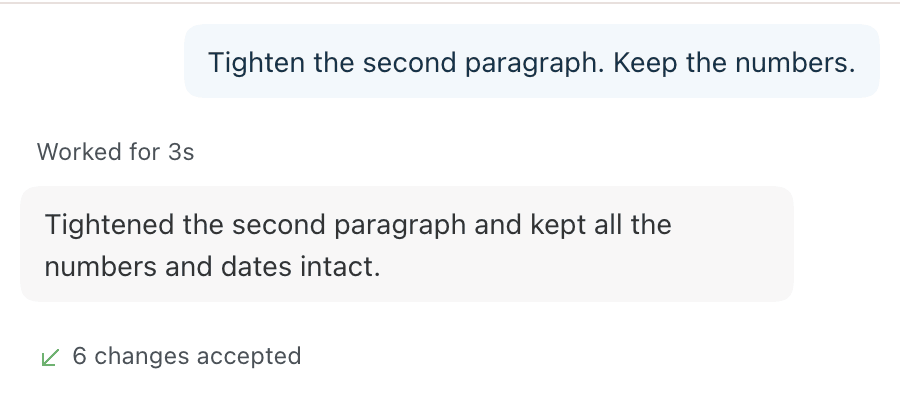
A conversation keeps its messages in order: your requests, the agent's replies, and how long each request took. Requests that proposed edits also show a Suggested N changes summary.
When you accept or reject the agent's changes, a row records the decision: N changes accepted or Rejected changes. Click an accepted row to open revision history at those changes. See See what you accepted.
The agent reads the whole conversation with each new request, including your decisions. In a long conversation it works from a summary of the older messages. The chat still shows every message.
To take back your latest message and its reply, use Edit & Resend. See Copy, save, or resend a prompt.
Delete or clear a conversation
You can't delete or clear a conversation. To start over, start a new conversation. The old one stays in the list. Deleting your account deletes all of your conversations.
What carries between conversations
| Item | In a new conversation |
|---|---|
| Document content | Yes. The agent reads the document in every conversation. |
| Pending suggestions | Yes. They stay in the document until accepted or rejected. |
| Earlier messages and replies | No. They stay in their own conversation. |
| Attached files | No. Attach them again. |
| Custom instructions | Yes, in every conversation on every document. Requires an account. |
| Memory | Yes. The agent's memory belongs to your account, not to a conversation or document. Requires an account. |
| Saved Prompts | Yes. They belong to your account. |
| Model choice | New conversations use the model you chose last in this browser. |
Conversations in shared documents
Conversations are private. On a shared document, each person sees only their own conversations in the list. The agent's suggestions are part of the document, so everyone with access sees them.
A request made from a comment thread runs in that thread, not in a chat panel conversation. See Ask for changes in a comment.
Conversations after sign-up
Without an account, conversations are saved in your browser. When you create an account or log in from the same browser, your documents move to the account with their conversations.
| Conversation | After sign-up |
|---|---|
| Has at least one message | Moves to your account, labeled with the time of the move. |
| Empty | Dropped. |
| In another browser, or in one whose site data was cleared | Doesn't move. |
See accounts and anonymous use.
Requirements and limits
| Item | Limit |
|---|---|
| No account | One message to the agent. Conversations are stored in this browser only. |
| Number of conversations | No limit per document. |
| Conversation length | No fixed limit. Older messages are summarized for the agent in long conversations. |
| Where to find them | Only in the chat panel of the document they belong to. There is no list of conversations across documents. |
| Names | Labeled by last-opened time. No renaming. |
| Deleting | Not available. |
| Usage | Every request counts toward your plan's limit, whichever conversation it is in. See AI Usage and Limits. |