Supported AI Models
Last updated
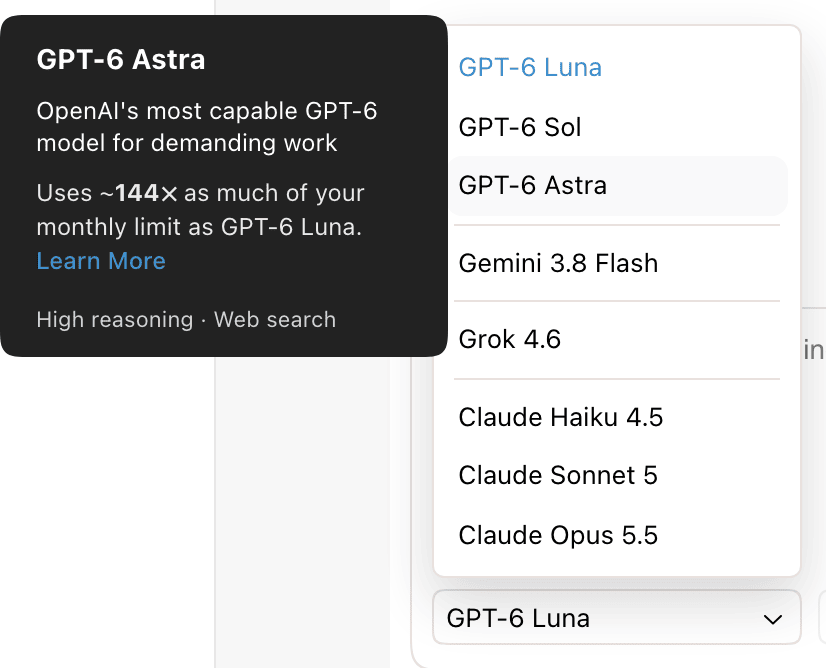
The Revise AI agent runs on models from OpenAI, Google, xAI, and Anthropic. You choose the model in the model picker below the chat input. The default model is GPT-6 Luna.
Available models
The table lists every model in the picker, in picker order. The usage column shows how much of your usage limit a request uses compared with the same request on GPT-6 Luna.
| Model | Provider | Plans | Usage vs. GPT-6 Luna | Picker tags |
|---|---|---|---|---|
| GPT-6 Luna | OpenAI | Free, Plus, Pro, Max | 1× (baseline) | Fast, Web search |
| GPT-6 Sol | OpenAI | Pro, Max | ~19× | High reasoning, Web search |
| GPT-6 Astra | OpenAI | Pro, Max | ~144× | High reasoning, Web search |
| Gemini 3.8 Flash | Plus, Pro, Max | ~11× | Fast, Long context | |
| Grok 4.6 | xAI | Plus, Pro, Max | ~44× | Reasoning, Real-time 𝕏 search |
| Claude Haiku 4.5 | Anthropic | Free, Plus, Pro, Max | ~17× | Extremely fast, Web search |
| Claude Sonnet 5 | Anthropic | Plus, Pro, Max | ~45× | Web search |
| Claude Opus 5.5 | Anthropic | Pro, Max | ~84× | Web search, High reasoning |
Hover over a model in the picker to see its description, its usage multiplier, and its tags.
Models by plan
| Plan | Models |
|---|---|
| No account | GPT-6 Luna, Claude Haiku 4.5 |
| Free | GPT-6 Luna, Claude Haiku 4.5 |
| Plus | GPT-6 Luna, Gemini 3.8 Flash, Grok 4.6, Claude Haiku 4.5, Claude Sonnet 5 |
| Pro | GPT-6 Luna, GPT-6 Sol, GPT-6 Astra, Gemini 3.8 Flash, Grok 4.6, Claude Haiku 4.5, Claude Sonnet 5, Claude Opus 5.5 |
| Max | GPT-6 Luna, GPT-6 Sol, GPT-6 Astra, Gemini 3.8 Flash, Grok 4.6, Claude Haiku 4.5, Claude Sonnet 5, Claude Opus 5.5 |
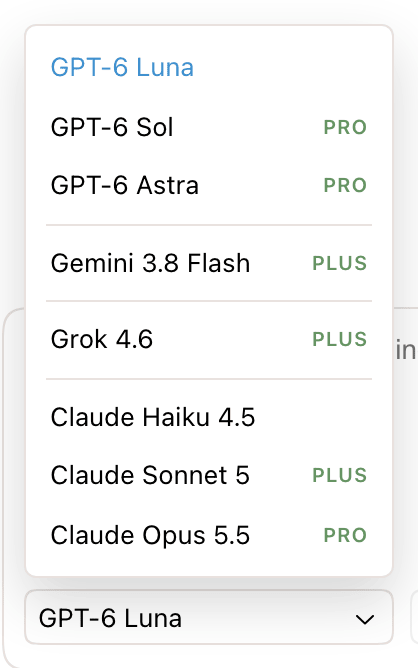
- The picker lists every model on every plan. A model your plan doesn't include shows the lowest plan that does, as PLUS or PRO.
- Choosing a locked model opens an upgrade offer for that plan. Without an account, it opens account creation.
- A paid account whose payment is overdue past the grace period gets the free models until payment goes through.
- If your plan no longer includes the selected model, the picker switches to GPT-6 Luna on the free models. On a paid plan, it switches to the highest model from the same provider that your plan includes.
For plan prices, see Pricing.
Usage cost by model
Every request counts toward your AI usage limit. Higher-cost models use it faster. The multipliers in the table above were measured from real agent requests, relative to GPT-6 Luna. A single request can use more or less than the multiplier suggests, depending on the document and the task.
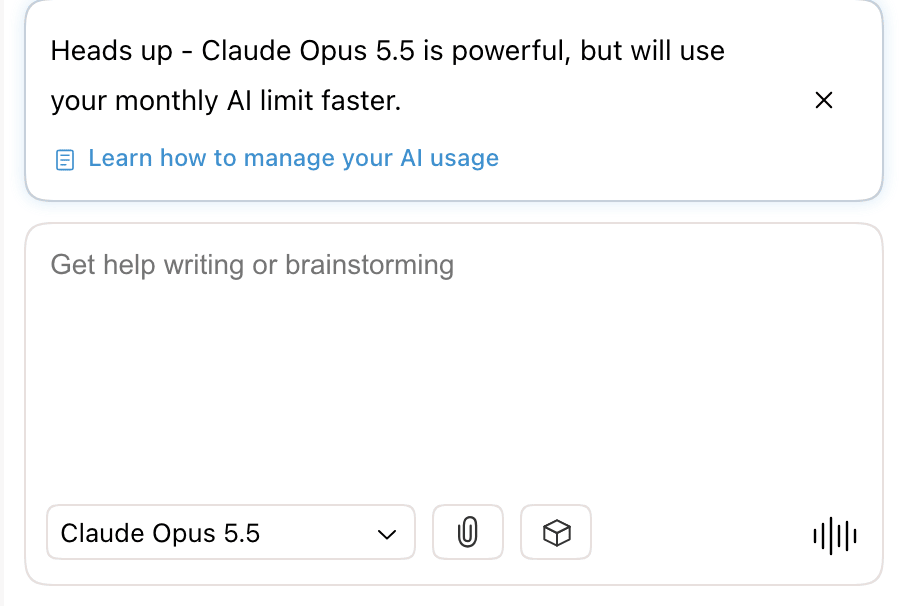
Choosing Claude Opus 5.5, GPT-6 Sol, or GPT-6 Astra shows a warning above the chat input. It says the model uses your monthly AI limit faster. Close it with the × button. The dismissal is saved to your account for that model only. Other usage warnings appear as you use more of your limit.
Features by model
| Model | Web search | Image attachments | PDF attachments |
|---|---|---|---|
| GPT-6 Luna | Yes | Yes | Yes |
| GPT-6 Sol | Yes | Yes | Yes |
| GPT-6 Astra | Yes | Yes | Yes |
| Gemini 3.8 Flash | Yes | Yes | Yes |
| Grok 4.6 | Web and 𝕏 | Yes | No |
| Claude Haiku 4.5 | Yes | Yes | Yes |
| Claude Sonnet 5 | Yes | Yes | Yes |
| Claude Opus 5.5 | Yes | Yes | Yes |
- Web search requires an account, on any plan. The agent decides when to search. Grok models also search posts on 𝕏. See searching the web.
- PDF attachments are refused with Grok models. The chat shows PDF attachments are not supported with Grok models. Switch to Claude or GPT to attach PDFs.
- Reasoning is set by Revise for each model. There is no setting for it. The Reasoning and High reasoning tags in the picker mark the models that reason more before answering.
Every model uses the same agent tools, so any model can edit, format, comment on, and read your document. See Agent Capabilities.
Default model
The default model is GPT-6 Luna on every plan, and without an account. Some requests use a fixed model regardless of the picker.
| Request | Model |
|---|---|
| A new conversation | Your last choice in this browser, or GPT-6 Luna if you never chose one |
| An automatic reply, after you open a new document with text or paste a large block | GPT-6 Luna |
| A request whose selected model fails partway | GPT-6 Luna for the rest of the request. These turns count at half their usage. |
Switch models
- Click the model picker below the chat input. It shows the name of the current model.
- Choose a model.
The new model answers from your next message. You can switch at any point in a conversation. During voice mode, the picker shows the current model and can't be changed.
Models used by other features
| Feature | Model |
|---|---|
| Voice mode | The spoken conversation runs on OpenAI's gpt-live-1 voice model. Edits you ask for by voice are made by the model selected in the picker. |
| AI Rewriter | Its own picker: GPT-6 Luna (default), Claude (Claude Haiku 4.5), Gemini (Gemini 3.8 Flash), and Grok (Grok 4.6). All four are available on every plan and without an account. |
| AI detection score | Computed by Pangram's AI detection service, not by a model from the picker. |